Workflow sheet
Webflow Code Export: What You Get, and the Hole in It
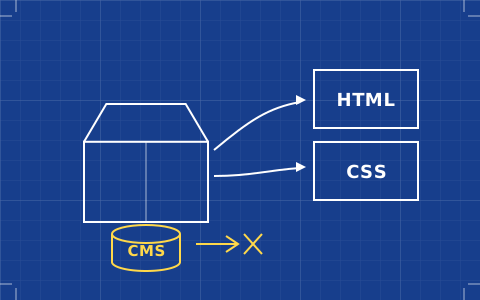
Export is the feature that lets you answer a client's portability question honestly — as long as you answer it accurately. What comes out, what stays behind, and what it costs.
- Issued
- 27 AUG 2026
- Last verified
- 19 SEPT 2026
- Reading
- 5 min
- Type
- Guide
Webflow code export is the single feature that separates Webflow from every other hosted builder a designer might choose, and it is routinely described inaccurately by people selling Webflow work. It is real, it is genuinely useful, and it has a hole in the middle that you need to understand before you put a portability clause in a contract.
Webflow's own pricing page states it plainly. Export gives you "clean, semantic HTML and CSS files for your dev team", and "dynamic content (CMS items/pages) can't be exported". Both halves of that sentence are load-bearing.
What comes out
You get the static site: HTML documents for your static pages, a stylesheet, your JavaScript for interactions, and your assets. The markup is clean by the standards of visual builders — semantic elements rather than nested wrappers, and crucially your own class names, because in Webflow you named them.
That last point is what makes the export worth something rather than being a technicality. Exported output from a tool that generates its own identifiers is code a developer will refuse to maintain. Exported Webflow output uses the class system you designed, which means the file a developer receives is legible and modifiable rather than being a generated artefact to be replaced.
What stays behind
Everything the CMS touches. Collection items do not export. Collection-generated pages — the template that produces one page per item — do not export. A site whose substance is 300 blog posts and 80 case studies exports its shell and leaves its substance on the platform.
Ecommerce is excluded on the same basis. So are the runtime services that only exist because Webflow is hosting the site: form handling has no backend once the files are yours, and site search stops being a feature and becomes a thing somebody has to build.
None of this is hidden — it is stated on the pricing page — but it is consistently glossed over in the sales conversation, and the gap between "we can export the site" and what actually lands in the zip is where client relationships go wrong.
What it costs, and where the feature lives
Code export is a workspace feature, not a site-plan feature. It is included on Workspace Core at $19 a month billed yearly and on Growth at $49; the free Starter workspace does not have it. Paying for a Premium site plan does not unlock it, and this surprises people regularly.
So the practical floor for a designer who needs export is a paid workspace plus whichever site plan the project needs — $15 plus $19 for a static site, $25 plus $19 if there is a CMS involved. The full arithmetic, including seats, is worked through on the Webflow pricing sheet.
When exporting is genuinely the right move
The strongest case is a static marketing site that a development team will take over and integrate into their own stack. You design and build in a tool that lets you work properly, they receive semantic markup with sensible class names, and nobody has to translate a Figma file into code by hand. That is a real workflow and it is the reason the feature exists.
The second case is insurance. Exporting periodically and keeping the output in version control means the design work survives a platform decision you do not control. It is not a full backup — the content is not in it — but it is meaningfully better than nothing, and it costs an afternoon a year.
When it is not
If the site is content-driven, exporting is close to pointless as a portability strategy. You would be taking the templates and leaving the content, and rebuilding the content layer elsewhere is the majority of the work. Better to accept that you are on the platform and plan the relationship accordingly.
It is also the wrong move if the intention is to save money on hosting. Once the files are yours, the editing experience is gone — there is no visual editor over an exported site, so every future change is a code change or a round trip through Webflow and another export. Studios that export to cut a subscription usually return within a year.
The forms question, which comes up every time
Forms deserve their own warning because they look like they export and do not work like it. The markup for a form comes out in the HTML, so the fields are all present and the thing looks complete. What does not come out is the submission endpoint, because that was Webflow's server accepting the post and storing the result.
An exported site therefore ships forms that render perfectly and go nowhere until somebody wires them to a service. It is a small job, but it is a job nobody budgeted for, and discovering it after a handover is how an export goes from being a selling point to being an apology.
What a periodic export is actually worth
There is a middle position that studios underuse. Exporting once a quarter and committing the output to a repository gives you a dated, readable record of the design as built — not a restorable backup, but a real artefact. If the platform changes its terms, or a client leaves, or you simply need to see what the header looked like eighteen months ago, it is there in plain files.
It also has a quieter benefit: the discipline of exporting forces you to notice how much of the site has drifted into the fragile layer. A project whose export gets less representative every quarter is a project whose value is migrating into the CMS, and that is worth knowing before somebody asks you to move it.
How to describe it to a client without overpromising
Say this: the design and the static pages can leave as standard HTML and CSS at any time; the content in the CMS cannot, and would need migrating separately. That sentence is accurate, it is reassuring in the way clients actually want, and it does not commit you to something that will be discovered as untrue at the worst moment.
And when the question behind the question is "what happens if we fall out", the honest comparative answer is that this is the best portability story in the category and it is still partial — which is worth knowing when you weigh Webflow against the alternatives on the best website builders for designers.
Queries raised on this sheet
Does Webflow code export include the CMS?
No. Webflow states on its pricing page that dynamic content — CMS items and CMS-generated pages — cannot be exported. You receive the static pages, the stylesheet, the interaction JavaScript and your assets, but the content model and its entries stay on the platform.
Which plan do I need for Webflow code export?
A Workspace Core plan at $19 a month billed yearly is the cheapest tier that includes it; Growth at $49 also has it, and the free Starter workspace does not. It is not tied to your site plan, so paying for Premium alone will not give you the feature.
Can you edit an exported Webflow site visually?
Not in Webflow. Once the files are exported they are ordinary HTML and CSS with no connection back to the designer, so changes are made in code or made in Webflow and exported again. Plan for one of those two workflows rather than assuming a hybrid.
Is the exported code good enough to hand to a developer?
Generally yes, and better than the category norm, because the class names in the output are the ones you created rather than machine-generated identifiers. A developer receiving it gets semantic markup they can read, which is the whole difference between an export being useful and being a curiosity.
See alsoWhere this tool lands against the rest of the set: the best website builders for designers.